

VMware Cloud Foundation has all the focus from VMware, so it’s about time that I finally start deploying this solution in my homelab.
VMware Cloud Foundation
I’m not going to take a whole deep dive on what VMware Cloud Foundation (VCF) is, there are very long and nice blogs about that you can find online. For example at Broadcom or VMware Blog Or even on YouTube.
But in short, what is VMware Cloud Foundation (VCF)? Well, VCF is a package that combines all VMware’s core technologies into a unified solution. This means so much as, that all the separated VMware solutions like vSphere, vSAN, NSX, and vRealize suite are still used but the right versions of each product is tested tougher so it’s a 100% sure that they will play nicely. The big difference here is that there will be an “SDDC Manager Appliance” that will be added to the list of appliances to manage them all, sounds a bit like something with a ring?
Preparing LAB02
Since my homelab “just” consists out of two physical nodes, I’ll need to nest VCF on these two nodes. I’ve got two ready made lab environments that already have all the IP-ranges, VLANs and resources in-place, they just need VMs. My LAB01 is still in use for a project so I cannot use it, LAB02 holds a old VMware Cloud Director (VCD) deployment that will be rendered obsolete when VCF 9 is GA, it’s also not running the last VCD version, and it’s been off for at least the past six months or so. Therefore I’ve removed all the VMs and we can now use LAB02.
While nesting the ESXi nodes, I like to use the images from William Lam’s Nested virtualization. These images are ready made templates that hold all kind of special settings to make them run smooth. Except for this time. Since I already know vSAN OSA and I only want to use the lasted an greatest features in my homelab I want to go for vSAN ESA. One thing the templates are missing are the settings specif for vSAN ESA.
I’ve tried to find some text on how to update the templates but couldn’t really find anything other then “[..] you will need to add NVMe controller and then update each disk to use the NVMe controller and then remove the SCSI controller before continuing [..]” William Lam
Just a word of caution here, if tried to update this after the first boot of the image… not a great way to get it working. Better to change these setting at straight after deploying the template. While on the topic of changes, maybe also set the CPU to cores instead of sockets. At least this works better with my LAB licenses (they are per socket licensed, less is better).
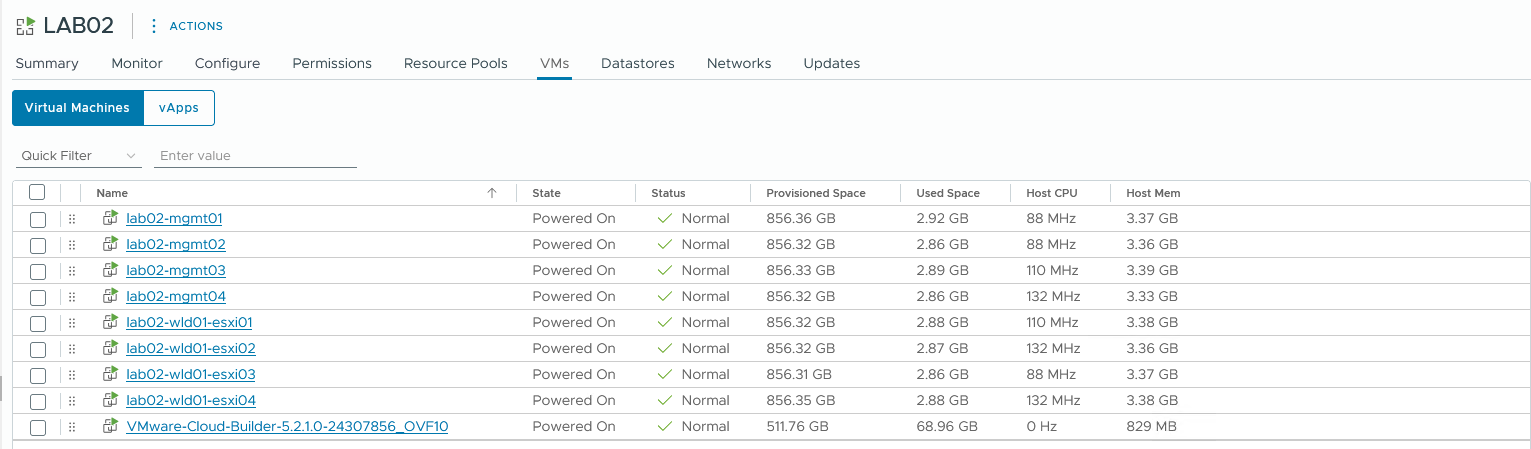
To start off with, I’ve download the latsest images from William Lam’s Nested virtualization. These are ready made templates that can be deployed and will be used as an ESXi node. For this first lab I’ll stick to four management nodes and four nodes for a workload domain.
Besides these eight nodes, also the VMware Cloud Builder applicance is required so I’ve deployed that as well
https://knowledge.broadcom.com/external/article/314608/correlating-vmware-cloud-foundation-vers.html
https://vronin.nl/vcf/vcf-5-0-error-connecting-to-esxi-host-ssl-certificate-common-name-doesnt-match-esxi-fqdn/
https://williamlam.com/2023/11/custom-vsan-hcl-json-for-vmware-cloud-foundation-vcf-5-1-and-vsan-esa-using-nested-esxi.html
https://williamlam.com/2023/12/dynamically-generate-custom-vsan-esa-hcl-json-for-vmware-cloud-foundation-vcf-5-1.html
https://www.dell.com/support/kbdoc/en-us/000213104/how-to-configure-ldaps-for-active-directory-integration
Prerequisites Ensure the following prerequisites are met.
Physical Network
1
2
3
4
5
6

Top of Rack switches are configured. Each host and NIC in the management domain must have the same network configuration. No ethernet link aggregation technology (LAG/VPC/LACP) is being used.
IP ranges, subnet mask, and a reliable L3 (default) gateway for each VLAN are provided.
Jumbo Frames (MTU 9000) are recommended on all VLANs. At a minimum, MTU of 1600 is required on the NSX Host Overlay VLAN and must be enabled end to end through your environment.
VLANs for management, vMotion, vSAN and NSX Host Overlay networks are created and tagged to all host ports. Each VLAN is 802.1q tagged.
Management IP is VLAN backed and configured on the host. vMotion & vSAN IP ranges are configured during the bring-up process.
DHCP with an appropriate scope size (one IP per physical NIC per host) is configured for the ESXi Host Overlay (TEP) network. Providing static IP pool is also supported but some Day-N operations like stretching a cluster will not be allowed if static IPs are used.
Physical Hardware and ESXi Host
1
2
3
4
5
6
7
8

All servers are vSAN compliant and certified on the VMware Hardware Compatibility Guide, including but not limited to BIOS, HBA, SSD, HDD, etc.
Identical hardware (CPU, Memory, NICs, SSD/HDD, etc.) within the management cluster is highly recommended. Refer to vSAN documentation for minimal configuration.
Hardware and firmware (including HBA and BIOS) is configured for vSAN.
One physical NIC is configured and connected to the vSphere Standard switch. The second physical NIC is not configured.
Physical hardware health status is 'healthy' without any errors.
ESXi is freshly installed on each host. The ESXi version matches the build listed in the Cloud Foundation Bill of Materials.
All hosts are configured and in synchronization with a central time server (NTP). NTP service policy set to 'Start and stop with host'.
Each ESXi host is running a non-expired license - initial evaluation license is accepted. The bring-up process will configure the permanent license provided.
Supporting Infrastructure
1

All hosts are configured with a DNS server for name resolution. Management IP of hosts is registered and queryable as both a forward (hostname-to-IP), and reverse (IP-to-Hostname) entry.